


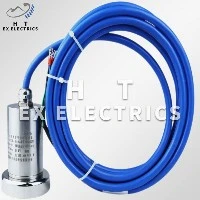
Hey there! As a supplier of Water Level Sensor, I often get asked how to program these sensors for specific alarm settings. It's a crucial aspect, especially when you're relying on accurate water level monitoring for various applications, whether it's in industrial settings, home automation, or environmental monitoring.
Understanding the Basics of a Water Level Sensor
Before we dive into programming, let's quickly go over what a water level sensor does. Simply put, it's a device that measures the level of water in a tank, reservoir, or any other container. It can use different technologies like ultrasonic, pressure, or float switches to detect the water level.
Our Water Level Sensor is designed to be highly accurate and reliable. It can provide real - time data about the water level, which is essential for maintaining the right amount of water in a system. For example, in an industrial water treatment plant, you need to know the exact water level to ensure proper operation of the treatment processes.
Why Specific Alarm Settings Matter
Alarm settings are like your safety net. They let you know when something is off with the water level. Maybe the water is getting too low, which could cause a pump to run dry and damage it. Or perhaps it's rising too high, posing a risk of overflow.
Let's say you have a rainwater harvesting system at home. You want to be alerted when the tank is almost full so you can make arrangements to use the excess water or divert it. On the other hand, if the level drops too low, you might want to know so you can switch to an alternative water source.
Step - by - Step Guide to Programming Alarm Settings
Step 1: Know Your Sensor
First things first, you need to understand the technical specifications of your Water Level Sensor. Read the user manual carefully. It will tell you things like the sensor's output range (usually in volts or milliamps), the measurement range (how high or low it can measure the water level), and the accuracy.


For instance, if your sensor has an output range of 0 - 5 volts and a measurement range of 0 - 10 meters, you need to know this information to set up the correct alarm levels.
Step 2: Choose Your Programming Method
There are different ways to program the alarm settings. You can use a dedicated programming interface that comes with the sensor, or you can use a microcontroller like an Arduino or a Raspberry Pi.
If you're using a dedicated programming interface, it's usually a matter of connecting the sensor to the interface and following the on - screen instructions. The interface will have options to set the alarm levels, the type of alarm (audible, visual, or both), and other related parameters.
On the other hand, if you're using a microcontroller, you'll need to write some code. Here's a simple example using Arduino:
const int sensorPin = A0;
const int alarmPin = 13;
const int lowLevelThreshold = 100; // Example value
const int highLevelThreshold = 900; // Example value

void setup() {
  pinMode(alarmPin, OUTPUT);
  Serial.begin(9600);
}

void loop() {
  int sensorValue = analogRead(sensorPin);
  Serial.print("Water level: ");
  Serial.println(sensorValue);

  if (sensorValue < lowLevelThreshold || sensorValue > highLevelThreshold) {
    digitalWrite(alarmPin, HIGH);
  } else {
    digitalWrite(alarmPin, LOW);
  }

  delay(1000);
}
In this code, we're reading the value from the water level sensor connected to analog pin A0. We've set a low - level and a high - level threshold. If the sensor value goes below the low - level threshold or above the high - level threshold, the alarm pin (connected to an external buzzer or LED) will be set high, triggering the alarm.
Step 3: Set the Alarm Levels
The key here is to determine the appropriate alarm levels based on your specific needs. If you're monitoring a small water tank for a home garden, the low - level alarm might be set when the water level is at 10% of the tank's capacity, and the high - level alarm at 90%.
To set these levels, you'll need to convert your desired water levels into the sensor's output values. For example, if your sensor has a linear output and you know that 0 volts corresponds to an empty tank and 5 volts corresponds to a full tank, you can calculate the voltage values for your alarm levels.
Step 4: Test and Calibrate
Once you've set the alarm levels, it's time to test the system. Fill the tank or container to different levels and see if the alarms are triggered as expected. If not, you may need to recalibrate the sensor or adjust the alarm settings.
Other Related Sensors and Devices
In addition to the Water Level Sensor, there are other sensors and devices that can work together to create a more comprehensive water management system.
The Pressure Sensor can be used to measure the pressure in a water pipeline. This can be useful for detecting leaks or blockages. For example, if the pressure suddenly drops, it could indicate a leak in the pipeline.
The Ultrasonic Flow Sensor can measure the flow rate of water in a pipe. This is important for applications where you need to know how much water is being used or transferred in a given period.
The Automatic Water Spraying Dust Reduction Device Main Unit can be integrated with the water level sensor. If the water level is sufficient, the device can automatically start spraying water to reduce dust in an area.
The Explosion - Proof Ball Valve can be used to control the flow of water. It's especially useful in hazardous environments where there's a risk of explosion.
Conclusion and Call to Action
Programming a water level sensor for specific alarm settings is not as difficult as it might seem. With a little understanding of your sensor and some basic programming knowledge, you can set up a reliable system to monitor water levels and get timely alerts.
If you're interested in purchasing our high - quality Water Level Sensor or any of our other related sensors and devices, feel free to reach out for a purchase negotiation. We're here to help you find the best solutions for your water monitoring and management needs.